


AMI Play
4.612.30K Reviews
App Specs
- Version
- 5.3.1
- Updated On
- License
- Free
- Downloads
- 1,000,000+
- Developer
- AMI Entertainment Network
- Categories
- Music & Audio
- Platform
- Android, iOS
Screenshots
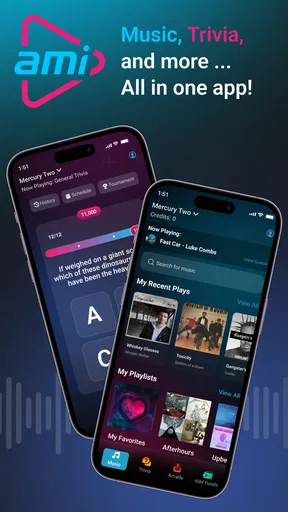
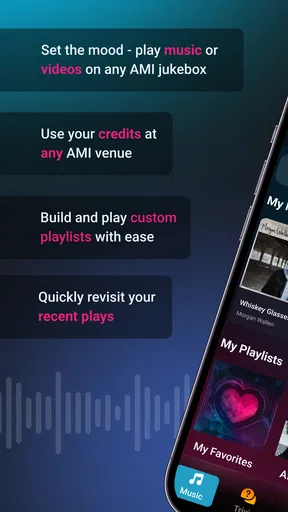
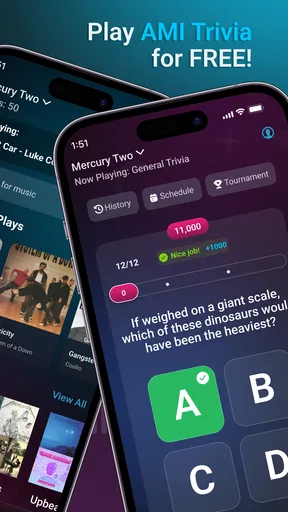
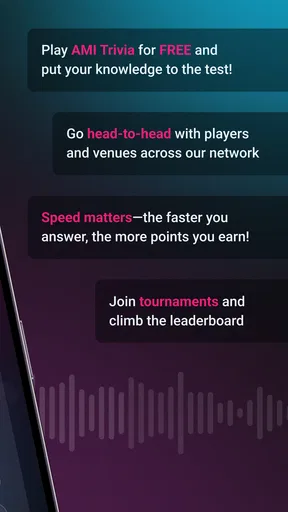
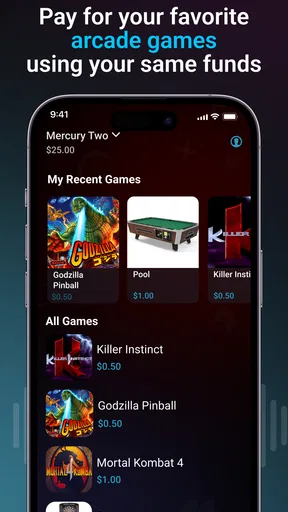
 Analysis by AppCompare
I think AMI Play makes the most sense when you’re already at a venue that uses AMI entertainment. Rather than serving as a general music player or a game collection for home, it gives your phone a role in that setting: you can use it to interact with the music, play trivia, and pay for arcade games. That venue-based focus is the key to deciding whether it belongs on your phone. If you want entertainment that follows you anywhere, a streaming app or a dedicated mobile game is a better fit; if you’re out with friends and want to join in with what’s happening around you, this has a more specific purpose.
Using your phone as part of the venue
The first practical question is whether the place you’re visiting uses AMI. This isn’t an app I’d open at home expecting a full catalogue of standalone entertainment. Its value depends on being somewhere its services are available, so it’s worth checking for an AMI setup before you rely on it for a night out. That dependency is not a small technical footnote; it defines the experience.
When the setting is right, the appeal is convenience. You can take part from your own phone instead of treating the venue’s entertainment as something only one person controls. That can make a difference in a group: friends can make music choices, take part in trivia, or engage with arcade play without passing around one device. I’d think of it as a companion to the venue’s shared entertainment rather than a replacement for the music or games themselves.
Connectivity is part of the experience
Because the app connects your phone to entertainment at an AMI venue, a working connection matters. I wouldn’t plan on it behaving like a downloaded playlist or an offline game when you’re away from a participating location. The useful mental model is a remote control and payment companion for a particular environment, not a self-contained library stored on your handset.
This changes how I’d use it. If I’m heading somewhere that offers AMI, I’d install the app and get through any setup before trying to make a music selection or join in during a busy moment. Doing that in advance avoids the awkwardness of dealing with an unfamiliar app while friends are waiting. Once there, I’d keep the phone connected and ready, especially if I’m using the features that interact with venue entertainment.
There’s also a social trade-off. A phone-based way to participate can be more convenient than walking up to a shared machine, but it still depends on the venue’s setup and your ability to connect. If the service isn’t available where you are, the app can’t create that experience on its own. For a playlist you control in any room, a regular streaming service remains the more dependable choice.
Good fit for a night out, not every mobile moment
A realistic use case is a casual evening with friends at a bar or another AMI-equipped venue. Instead of spending the whole time on your own phone, you can use it briefly to contribute a song choice, take part in trivia, or pay for arcade entertainment, then put it away and enjoy the group. That makes the app most appealing to people who want a small, practical way to join in with what the venue offers.
Worth Reading Before You Choose

EA SPORTS FC Mobile 26 Is a Bigger Football Game, but It Takes Time

Flipboard Shows What News Apps Must Do Beyond the Feed

Switching to Android Auto Means Rethinking Your Driving Routine

Google Calendar Makes a Crowded Week Easier to Manage

Ludo King Makes the Most of the Minutes Between Plans

Baby Panda World Brings Quick Play to Modern Phones, but Its Game Library Feels Busy
It’s less compelling if you want something to fill a commute, a queue, or a quiet stretch at home. Those are situations where a self-contained game or an audio app is ready regardless of location. AMI Play’s purpose is narrower, and I consider that a strength only when I’m actually visiting the kind of place it serves. Before downloading, ask yourself how often you go to participating venues; that answer matters more than how much you usually enjoy mobile games or music apps.
The app is free, which makes trying it a low-commitment decision, but free does not mean every venue interaction is automatically cost-free. Since it can be used to pay for arcade games, I’d treat each paid activity as a separate choice and check what I’m confirming before proceeding. That is a useful habit in any app that helps you make purchases away from home, particularly when you’re socialising and might otherwise tap through quickly.
Small habits that reduce friction
For a smoother visit, I’d set up the app while I have time and make sure I know how to get back to it quickly. If I’m going with a group, it helps to decide whether we want one person to handle music choices or whether everyone will use their own phone. That simple agreement can prevent a string of competing requests and keep the app from becoming the focus of the evening.
I’d also separate choosing entertainment from spending on it. Taking part in music or trivia and paying for arcade play are different kinds of activity, so I wouldn’t assume that using one feature implies anything about the cost of another. Pausing to review a payment action is a sensible way to stay in control, especially if someone else is looking at the screen or suggesting a game.
For data-conscious use, the most important practical point is that this is a connected, venue-oriented experience, not a reason to stream audio on your own mobile connection for hours. I’d use it when I need to interact with the local entertainment and close it when I’m finished. If you’re trying to conserve battery or mobile data, avoid leaving any app open unnecessarily and use a trusted connection when one is available. Those are sensible general precautions rather than special requirements unique to this app.
What it does—and what it doesn’t replace
AMI Play sits between familiar categories. It has a music-related role, but it isn’t the same as Spotify or another personal streaming app, where your own library and listening habits travel with you. It also has games and trivia in the mix, but I wouldn’t compare it with a full mobile game platform built for long solo sessions. Its differentiator is the connection to entertainment in a physical venue.
That makes it useful for people who regularly visit places with AMI and want their phone to help them participate. It is also a reasonable option for someone who prefers handling venue interactions on their own device rather than relying entirely on a shared screen. On the other hand, people who rarely go to those venues, want offline entertainment, or expect a broad catalogue of games should look elsewhere. The app’s value is situational, not universal.
One point I’d keep in mind is that the experience may feel different from one visit to another because the venue is part of the equation. Your phone is only one side of the interaction. If a feature you want isn’t available in the place you’re visiting, switching between menus won’t solve that; it’s better to treat the app as a way to access what the local setup supports. That expectation helps avoid confusing a venue limitation with a problem on your phone.
Who should give it a try
AMI Play is a sensible download for people who go to AMI venues and like taking an active part in the music, trivia, or arcade options there. It can also suit a group that wants a convenient way to contribute without making one person the permanent operator. I would skip it if my main goal were to listen to music privately, play games anywhere, or find entertainment that works without a venue connection.
It’s rated for Everyone, and the app is free. Still, an Everyone age rating doesn’t remove the need for adults to guide children around payment choices or screen time. If a child is using a phone at a venue, I’d keep the device in view and handle any spending decisions myself. That’s a practical safeguard, not a claim that the app has specific family controls.
AMI Entertainment Network is the developer, and the app has a 4.6 average from around 64,000 ratings, with over a million installs. Those figures suggest that it has found an audience, but they don’t tell me whether it will suit a particular venue or outing. I’d base that decision on whether AMI entertainment is available where I actually go and whether I want to use my phone for those interactions.
What to expect when something goes wrong
If a feature doesn’t respond, I’d first check the basics: am I at a venue that uses AMI, is my phone connected, and am I trying to use the feature in the right context? Those checks are more useful than repeatedly tapping the same control. If the venue connection is unavailable, choosing a different phone setting is unlikely to provide the same service; I’d switch to the venue’s other options or simply enjoy the evening without the app.
For a problem that follows me beyond one visit, I’d close and reopen the app, check that I’m using the current release, and try again when the connection is stable. The current version is 5.1.4, and the app has been available since June 29, 2012, so it isn’t a new experiment in this category. Even so, a long history doesn’t guarantee that every venue interaction will be seamless, and I’d avoid relying on it as the only way to access entertainment during a time-sensitive moment.
People often wonder whether they can use the app without visiting a participating venue, whether it replaces a normal music subscription, and whether every activity costs money. The practical answers are that its main purpose is venue interaction, it doesn’t replace a personal streaming service, and arcade payment is a distinct use that deserves attention before confirming. If those boundaries match what you want, it’s easier to judge the app fairly.
My connectivity verdict
I see AMI Play as a useful, focused companion rather than an everyday entertainment essential. Its best moments happen when the venue, phone, and group are all in sync: you can make a choice or join an activity without turning the whole outing into a phone session. The main limitation is the same thing that gives it its identity: its usefulness depends on where you are and what that location supports.
If I were going somewhere with AMI entertainment, I’d be happy to have it ready before I arrived, especially for a group outing where music and arcade games are part of the plan. If I wanted something to use on the bus, at home, or wherever I happen to be, I’d choose a regular audio or gaming app instead. That distinction keeps expectations sensible and makes the app much easier to appreciate.
First Impressions
Opening AMI Play for the first time is like entering a colorful carnival. The interface is sleek, intuitive, and, most importantly, user-friendly. You won't find yourself lost amidst complicated menus. Instead, the app welcomes you with vibrant visuals and a straightforward navigation system that even a beginner can master in no time.
Gameplay and Features
The gameplay is where AMI Play truly shines. It offers a variety of mini-games that cater to different interests, ranging from puzzles to action-packed adventures. Each game is crafted with attention to detail, ensuring that players remain hooked for hours. The app supports both single-player and multiplayer modes, allowing you to challenge friends or enjoy a solo gaming session.
One of the standout features is the reward system. As you progress through the games, you earn points that can be redeemed for exciting in-app purchases. This element adds an extra layer of motivation, keeping you engaged and eager to play more.
User Experience
What really impressed me about AMI Play is its seamless performance. No annoying lags or crashes that disrupt your gaming experience. The developers have done an excellent job optimizing the app for both Android and iOS, ensuring a smooth ride on any device.
Moreover, the app frequently updates its game library, so there’s always something new to explore. The community aspect is also worth mentioning. You can connect with players worldwide, share tips, and even participate in global tournaments. It's a fantastic way to make gaming a social experience.
Sound and Graphics
The graphics in AMI Play are nothing short of stunning. Each game is designed with vivid colors and detailed animations that make the gaming experience visually appealing. The sound effects and background music complement the graphics perfectly, immersing you in the game’s atmosphere.
Whether you’re dodging obstacles in an action game or solving puzzles, the soundtracks are tailored to enhance the mood, making every moment enjoyable. Make sure to plug in your headphones for an even better experience!
Why You Should Try It
If you’re looking for a versatile app that offers a plethora of gaming experiences, AMI Play is worth every megabyte of download space. It combines entertainment, competition, and social interaction in one neat package. Plus, the free-to-play model with optional in-app purchases means you can enjoy most of its offerings without spending a dime.
For parents worried about their kids spending too much time on games, AMI Play includes parental controls to limit playtime, ensuring a balanced gaming experience. It’s a thoughtful addition that makes the app suitable for all ages.
Final Thoughts
All in all, AMI Play is an app that delivers on its promise of fun and engagement. It’s a fantastic choice for anyone looking to add a bit of excitement to their daily routine. So, why not give it a try? Download it today and let the games begin!
Pros
- User-friendly interface for easy navigation.
- Wide variety of music genres available.
- Offline listening option saves data.
- High-quality audio for an immersive experience.
- Personalized playlists enhance user engagement.
Cons
- Limited free version features.
- Ads can be intrusive for free users.
- Some songs unavailable offline.
- Occasional app crashes reported.
- Updates required frequently for bug fixes.
FAQs for AMI Play
What is AMI Play and what features does it offer?
AMI Play is an interactive gaming app designed to enhance your cognitive skills through a series of challenging puzzles and games. It offers features such as customizable difficulty levels, a variety of game modes, and regular updates with new content. Additionally, users can track their progress and compete with friends on leaderboards.
Is AMI Play available on both Android and iOS platforms?
Yes, AMI Play is available for download on both Android and iOS platforms. You can find it on the Google Play Store for Android devices and the Apple App Store for iOS devices. Ensure your device meets the minimum operating system requirements for a smooth experience.
Does AMI Play require an internet connection to function?
While AMI Play can be enjoyed offline, some features such as leaderboards and daily challenges require an internet connection. Offline play allows you to access most of the games and puzzles, but connecting to the internet provides a more enriched experience with additional content and updates.
Are there any in-app purchases or subscriptions in AMI Play?
AMI Play offers a free version with optional in-app purchases and subscription plans. These purchases can unlock additional content, remove ads, or provide access to premium features. The app is fully functional without purchases, but these options can enhance your gaming experience.
How does AMI Play ensure user privacy and data security?
AMI Play is committed to protecting user privacy and data security. The app complies with industry standards and regulations, encrypts user data, and provides clear privacy policies. Users can review the privacy settings within the app and adjust permissions according to their preferences.


